Spotlight Search on Mac is not Finding All My Files and Documents
No ratings yet.
If you are searching for files on your Mac and feel that the results are incomplete or not accurate, here is how to rebuild the Spotlight index on your Mac computer in order to ensure that your documents and files are fully searchable by Apple’s Spotlight search feature.
How to rebuild the Spotlight Index on your Mac
To ask macOS to refresh the Spotlight index on a drive, you essentially turn indexing off on that drive, and then turn it back on again:
-
Select the Apple menu in the top left corner of your Mac and pick "System Settings."
-
Click the "Spotlight" choice or the "Siri & Spotlight" option.
-
Choose the "Search Privacy" or "Spotlight Privacy" button.
-
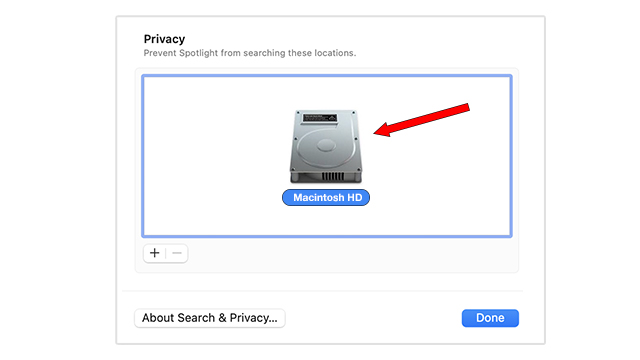
Select and drag your hard drive (often named Macintosh HD) that you want Spotlight to re-index to the list of locations that Spotlight is prevented from searching. In addition to dragging, you can also click the add button (+) to add it that way.
-
Wait a few seconds and then click the remove button (–) to remove your Macintosh Hard Drive from this list. This will then force Spotlight to "re-index" all the files on your computer so that they appear in search results.
-
Select Done.
Note: The re-index can often take a little time and this all depends on the amount of data that Spotlight has to re-index. Be patient and when you try your Spotlight search again you should now see the entire contents of your Macintosh hard drive indexed and searchable.
Source: If you want to read more about how to have Spotlight re-index the files on your Mac, you can navigate to Apple's official instructions here.
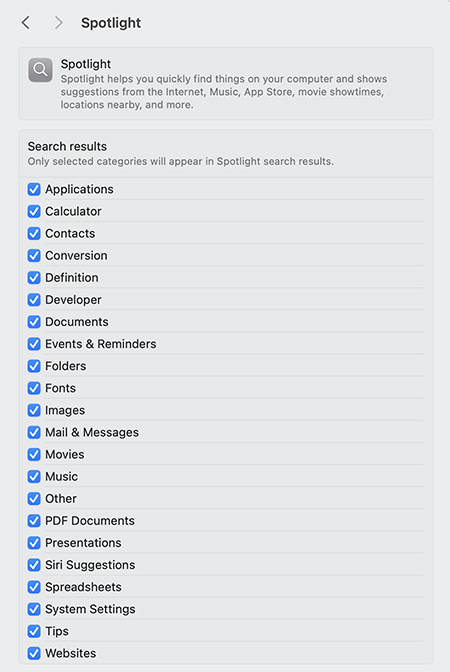
Make sure you've allowed Spotlight to search all the files on your Mac.
Here is one additional thing to check in order to ensure that all the files on your Mac are searchable.
Select System Settings on your Mac, click on "Spotlight" or "Siri and Spotlight," and make sure that all the file categories are checked so that they are available to be indexed and searched by Spotlight.