


iPhone Support - Are iPhone text messages exportable?
No ratings yet.
Question from iPhone user:
"Are the text messages on my iPhone exportable? I don't want to take screenshots since I have a lot of texts that I need to save to PDF and print out for work before I get a new iPhone. Is there a way to save all the text messages off the phone?"
-Michael Buck, San Diego, California
Answer:
"Yes, it is possible to export and save iPhone text messages from the Messages app on iPhone to any Windows or Mac computer. The popular third-party app Decipher TextMessage is the tool of choice for iPhone users who need to extract, save, and print text messages."
Follow along with these steps to export and save iPhone text messages to any computer:
-
Install the Decipher TextMessage app on your computer.
-
Plug an iPhone into your PC or Mac and select the “Back Up” option in the program.
-
Choose "Export" and pick “Current Conversation PDF."
-
Select a folder on your computer to save the PDF of your iPhone text messages.
-
You have now successfully exported text messages from iPhone to your computer.
Bonus tip: To print the exported iPhone text messages, open the saved PDF in your PDF viewing software on your computer and select “Print” to print out the iPhone text messages.
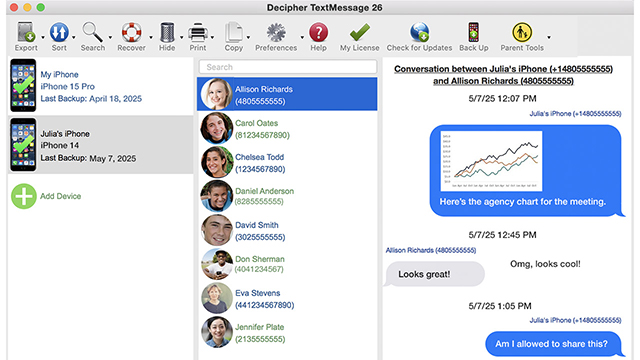
After opening Decipher TextMessage and backing up your iPhone in the program, the software will display all your text messages with any contact. Here is an example of how your iPhone text messages and contacts appear when they are imported into the app on your Windows PC or Mac.
Download Decipher Text Message
What are my export options and choices when saving text messages from iPhone?
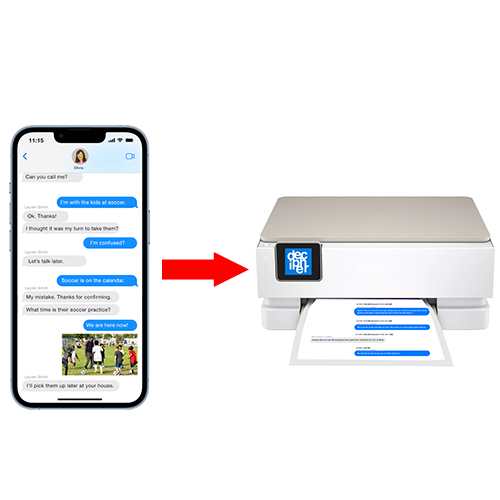
Decipher TextMessage gives any iPhone or iPad user the ability to export, save, and print text messages, iMessages, and SMS/MMS messages.
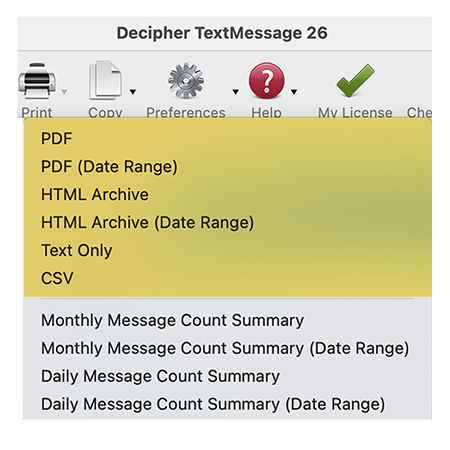
Decipher TextMessage offers the following helpful export format options:
-
PDF
-
PDF (Date Range)
-
HTML
-
HTML (Date Range)
-
Plain Text (TXT)
-
CSV / Excel
When you are using Decipher TextMessage and select "Export," you'll see the different export options displayed in the program so that you can choose the one that best fits your specific SMS export needs.
What does an exported text message document in PDF format look like?
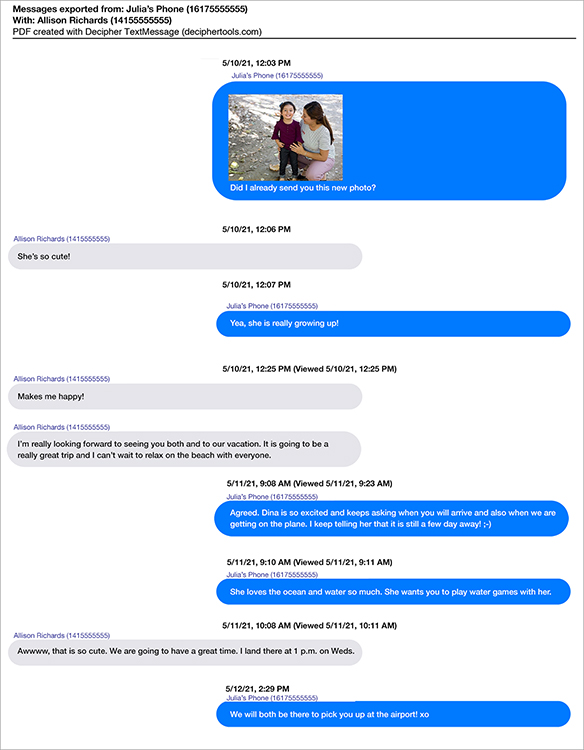
Below is an example document exported with Decipher TextMessage software. Notice that the software preserves the "chat-bubble" formatting as displayed in the Messages app on your iPhone.
Additionally, take note that there is important metadata like the contact information and date and timestamp on all text messages both received and sent. This is a unique preference in Decipher TextMessage software that is critical for organizing and archiving text messages for personal use, business reasons, court, evidence, or legal documentation.
"The ability to transfer and save text message threads for court purposes is very useful. Decipher TextMessage also provided a summary count of texts and attachments by month/year etc... Very helpful for billing proof!"
-Melinda / January 27, 2026 ★ ★ ★ ★ ★
When I use software to export text messages, is my text message data public?
Always make sure that the third-party software you are using is trusted and vetted.
If you are saving text messages with Decipher TextMessage, all your personal text message data is private on your PC or Mac computer. Anytime you purchase a program to copy and save text message data, make sure the software is reputable and doesn't ever store your text message data in the cloud or online!
Source: Decipher Tools Software / Decipher TextMessage verification and data privacy..
Is there a video I can watch so I can better understand how to save and export my iPhone text messages?
If you need additional help, here is a simple instructional video that walks you through how to export and print out iPhone text messages.