


iPhone Support - Can I back up only my text messages and not my entire iPhone?
No ratings yet.
Question from iPhone user:
Is there a way that to back up just my iPhone text messages and not my entire iPhone?
-Rhett Anderson, Seattle, Washington.
Answer:
Yes. The software Decipher TextMessage gives any iPhone user the ability to back up just their iPhone text messages and not their entire iPhone. iPhone users will then have a separate copy of all their text messages backed up and stored on their Windows or Mac computer for safekeeping.
Follow these steps to back up only text messages and not one's entire iPhone
-
Plug your iPhone into any Windows or Mac computer
-
Open Decipher TextMessage.
-
Select "Back Up" and choose the "Make Backup" option in the program.
-
After the backup finishes, all your text messages from all your contacts will be imported into the program.
-
You have now successfully completed making a backup of just your iPhone text messages to your computer.
Download Decipher Text Message
After the custom "Text Messages Only" backup completes, you will see your iPhone in Decipher TextMessage.
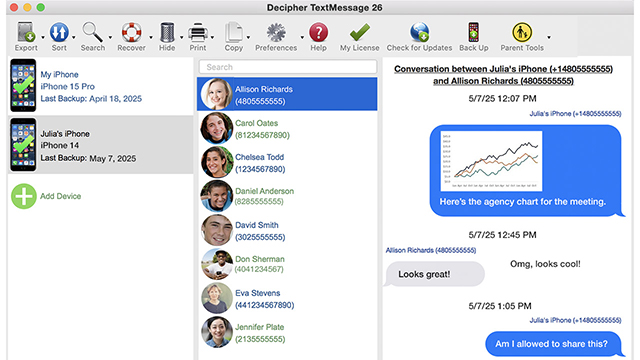
When you select any contact you'll see all your text messages with that contact or group chat displayed in the program.
You now have a complete back up of all your iPhone text messages from all your contacts on your PC or Mac.
After making the "Text Message Only" backup, will my iPhone text messages remain on my computer always?
Yes, after you use Decipher TextMessage to make a "Text Message Only" backup, all your text messages are then stored on your computer in the program.
The text message history is a separate stand-alone copy of all your text messages, iMessages, and photo / video attachments.
If I delete text messages off my iPhone will that affect any of the text message history stored on my computer in Decipher TextMessage?
No! The text messages imported into Decipher TextMessage are a completely separate stand-alone copy of your messages. Deleting text messages off your iPhone won't ever cause text message data in Decipher TextMessage on your computer to be altered or erased.
Now that I've made a back up of just my text messages on my computer, am I also able to export, save, and print text messages?
Yes, Decipher TextMessage also gives any iPhone user the ability to save and print text messages with any contact.
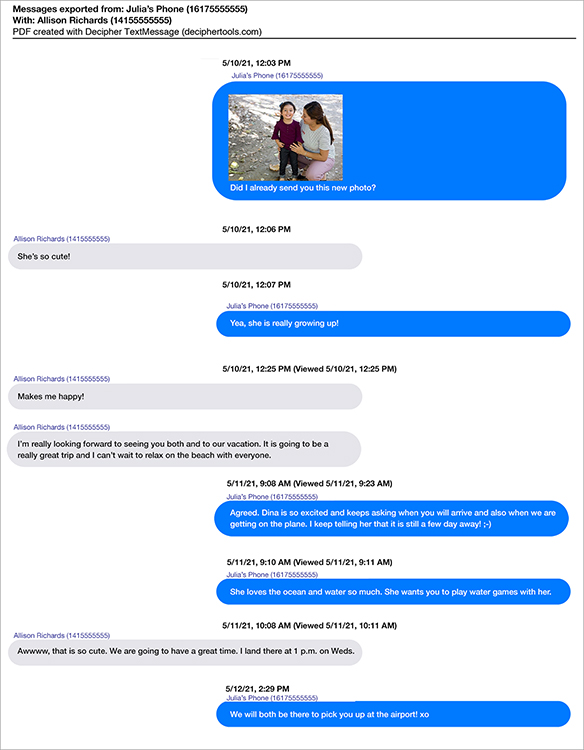
Simply choose a contact in the program and select EXPORT and select the PDF option. You can then export iPhone text messages as a PDF document to your PC or Mac computer.
Below is an example PDF of what iPhone text messages look like when exported using Decipher TextMessage. You can then print the PDF of your text messages or email and share the PDF with anyone you choose.
If you need any additional help to back up just your iPhone text messages and not the entire contents of your iPhone, feel free to send us a support email and one of our Decipher Tools team will reply back from either our San Francisco or Phoenix USA offices.